
Finelo: Master Trading
Finelo LimitedEducation
4.614.02K Reviews
- Version
- 1.27.49
- Installs
- 1.00M
- Age Rating
- Teen
Screenshots


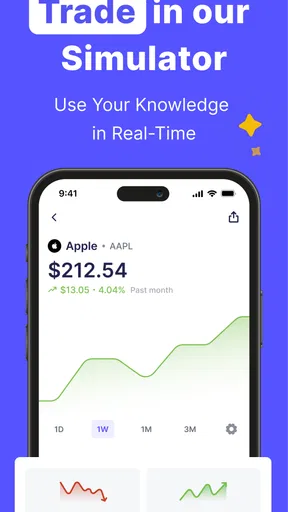



Our Review of Finelo: Master Trading
 Analysis by Appyee
When I use Finelo: Master Trading, the main challenge is not finding a button; it is knowing what to do with the information once it appears. Trading terms, chart movement and market commentary can arrive together, and a beginner may be tempted to treat a confident-looking signal as an instruction. I find the app more useful when I open it with a learning question in mind, rather than expecting it to tell me what to buy or sell.
That distinction matters because learning about markets and making financial decisions are not the same task. I’d use Finelo to build familiarity with concepts and review analysis, then pause before acting on anything outside the app. If you are looking for a guaranteed shortcut to profit, or a tool that can remove the risk from trading, this is not the right expectation to bring to it.
Where beginners can get stuck
The first snag is often vocabulary. Even a straightforward chart can be hard to interpret if you are still learning what its movements represent. I recommend choosing one unfamiliar term or chart element at a time and looking for its meaning before moving on. Trying to absorb every tool in a single sitting can make a learning app feel more complicated than it needs to be.
Another source of friction is the difference between market analysis and a personal recommendation. AI chart analysis and expert tools can help direct attention to patterns, but they do not know your finances, goals or tolerance for loss. I treat that material as a prompt for further learning, not as a decision made on my behalf. That small habit makes the experience more grounded and helps keep the app in its proper role.
Finelo is an education app from Finelo Limited, and that is the lens I’d keep in view while exploring it. It is free to install, but it includes in-app purchases, with items listed from $9.99 to $99.99. I would check the purchase details carefully before committing, especially if I only want a short introduction to trading. The app is rated Teen, so younger users should still approach financial topics with adult guidance rather than treating lessons as a substitute for it.
Make setup work for your learning style
Before settling into a lesson or chart, I’d check that the app is current and that the device meets its minimum operating-system requirement of version 10. Finelo’s current version is 1.26.0. These are simple checks, but they can rule out avoidable setup issues before you spend time troubleshooting a screen that is slow to load or behaving unexpectedly.
I would also decide how much time I actually want to give the app. A short, focused session is often easier to sustain than opening several topics at once. For example, I might spend one session learning how to read a chart, then return later to review how analysis tools frame the same kind of movement. Keeping a small note of questions to revisit can turn scattered browsing into a more deliberate learning routine.
If alerts start to distract you, take a moment to review their settings rather than letting every notification interrupt your day. The original experience can feel noisy until preferences are adjusted. I’d keep only alerts that support a specific learning or checking habit, and silence the rest. That makes it easier to open the app when I choose, rather than responding to every prompt as if it were urgent.
Recover your workflow without rushing
If a screen or tool does not behave as expected, I’d first close and reopen the app, then check whether the issue persists after confirming the app and device are up to date. If one section is confusing rather than broken, I’d return to a simpler learning task instead of tapping through more menus at random. A reset to a familiar topic can help separate a technical hiccup from plain information overload.
For a chart or analysis that seems surprising, I’d slow down and compare what I am seeing with the question I started with. Is the information hard to understand, or did I expect it to make a decision for me? That distinction can prevent a moment of confusion from turning into an impulsive trade. I also avoid treating community discussion as proof: other users’ opinions can be interesting, but they are not a replacement for checking the reasoning yourself.
Learning with a clear purpose
On an ordinary weekday, I might open Finelo during a quiet break, choose one concept I have been struggling with, and spend a few minutes tracing how it relates to a chart. I would write down what remains unclear and leave the app without feeling obliged to place a trade. Later, I could revisit that question with a fresher head. This is a more useful routine than checking market commentary repeatedly throughout the day, especially if constant updates make it harder to think calmly.
When the problem may be outside the app
Sometimes the uncomfortable part is not a setup fault at all. A market can move in a way that conflicts with what you expected, and no learning platform can make that uncertainty disappear. If you find yourself reacting to every change or feeling pressured to act quickly, stepping away is a sensible response. Finelo can support study, but it cannot decide whether trading is appropriate for your circumstances.
It is also worth separating app access from the quality of a conclusion. If a chart or explanation appears incomplete, check your connection and revisit the material later before drawing a firm conclusion. If the same technical problem continues, use the app’s available support route rather than assuming a market tool is giving a meaningful signal. I would not make a financial decision based on a display I do not understand.
Compared with learning from scattered videos, articles and social posts, an all-in-one education app can make it easier to keep lessons and analysis in one place. The trade-off is that a single app’s presentation may not provide the range of viewpoints you get from comparing independent sources. For a beginner, Finelo can be a useful starting point; for someone who wants deep, formal study or independent research, books, courses and primary financial sources may be a better complement.
Its audience appears substantial: Finelo has an average rating of 4.5 from around 34,000 ratings, with roughly 4,400 written reviews and over 500,000 installs. Those figures suggest that many people have tried it, but they do not tell me whether it fits a particular learner. I’d judge it by whether its explanations help you think more clearly, not by popularity alone.
Hey there! So, I recently got my hands on this app called Finelo: Master Trading, and I’ve got to say, it’s quite the intriguing little piece of software. If you’re someone who’s been dabbling in trading or just curious about the financial markets, this could be your next go-to app. Let me walk you through my experience.
Getting Started with Finelo
The first thing you’ll notice when you open Finelo: Master Trading is its slick and intuitive interface. It’s like the developers knew exactly what we want—everything is right where you’d expect it to be. Setting up was a breeze; just a couple of taps and I was ready to dive into the world of trading.
One feature that caught my eye was the demo account option. For beginners, this is a goldmine. You can practice without risking any real money, which is a huge relief if you’re still learning the ropes. It’s pretty much like playing with Monopoly money but with real market data.
Exploring the Features
Now, let’s talk about the features. Finelo is packed with tools, from real-time charts to customizable trading alerts. What I found particularly helpful was the in-depth market analysis section. It’s like having a financial advisor in your pocket, providing insights and forecasts that can help you make informed decisions.
The app also offers a wide range of trading instruments. Whether you’re into stocks, forex, or commodities, Finelo has got you covered. The ability to diversify your portfolio with ease is a major plus point.
One nifty feature is the community forum. It’s a great place to swap tips, share experiences, and learn from other traders. Plus, it’s always fun to see how others are doing and pick up a few pointers along the way.
Navigating the Challenges
Of course, no app is perfect, and Finelo is no exception. While the interface is user-friendly, there’s a bit of a learning curve if you’re entirely new to trading. The sheer amount of information can be overwhelming at first, but with a bit of patience and exploration, you’ll find your way around.
Also, the notifications can be a bit much if you don’t tweak the settings. I found myself bombarded with alerts until I customized them according to my preferences. Once you get that sorted, it’s smooth sailing.
Final Thoughts
All in all, Finelo: Master Trading is a powerful tool for anyone interested in the financial markets. Whether you’re a seasoned trader or a curious newbie, there’s something here for everyone. The combination of a user-friendly interface, comprehensive features, and a supportive community makes it stand out in a sea of trading apps.
So, would I recommend it? Absolutely. Just remember to take your time exploring all it has to offer, and you’ll be well on your way to mastering the art of trading. Happy trading!
Privacy and Permissions
See what permissions an app requests and how it handles your data.
- Phone
- read phone status and identity
- Photos/Media/Files
- read the contents of your USB storage, modify or delete the contents of your USB storage
- Storage
- read the contents of your USB storage, modify or delete the contents of your USB storage
- Camera
- take pictures and videos
- Device ID & call information
- read phone status and identity
- Other
- view network connections, full network access, run at startup, control vibration, prevent device from sleeping, Google Play license check
Verdict
Strengths of Finelo: Master Trading
- User-friendly interface enhances learning.
- Comprehensive tutorials for all levels.
- Real-time market analysis tools available.
- Customizable alerts for price changes.
- Supports multiple trading platforms.
Limitations of Finelo: Master Trading
- Advanced features require a subscription.
- Occasional lag in data updates.
- Limited customer support options.
- High battery consumption during use.
- Some features can be overwhelming for beginners.
Similar Picks in This Category
View All
Duolingo: Language Lessons
Duolingo4.7

Google Classroom
Google LLC2.8

Unacademy: Learn & Crack Exams
Unacademy3.2

Bible App for Kids
Life.Church4.4

Cake - Learn English & Korean
Cake Corp.4.7

Brainly: AI Homework Helper
Brainly4.5
Frequently Asked Questions
What platforms is Finelo: Master Trading available on?
Finelo: Master Trading is available for both Android and iOS platforms. You can download it from the Google Play Store for Android devices and the Apple App Store for iOS devices. Ensure that your device meets the minimum system requirements for optimal performance.
Is Finelo: Master Trading suitable for beginners?
Yes, Finelo: Master Trading is designed with beginners in mind, offering comprehensive tutorials and a user-friendly interface. The app provides educational resources and simulated trading environments to help new users understand the basics of trading before jumping into real market scenarios.
Does Finelo: Master Trading require an internet connection?
Yes, an active internet connection is required to use Finelo: Master Trading. The app relies on real-time data to provide users with the latest market trends, price updates, and trading opportunities. Offline functionality is limited to viewing downloaded educational materials.
Are there any in-app purchases in Finelo: Master Trading?
Finelo: Master Trading offers a range of in-app purchases. These may include premium features, additional educational resources, and advanced trading tools. While the basic version is free, purchasing these extras can enhance your trading experience and provide more in-depth insights.
How secure is my information on Finelo: Master Trading?
Finelo: Master Trading prioritizes user security, employing robust encryption methods to protect personal and financial information. The app complies with industry standards for data protection, but users are advised to regularly update passwords and enable two-factor authentication for enhanced security.
